 12-MAY-2026 news: due to popular demand a new batch of OrpheusII
is in the works!
12-MAY-2026 news: due to popular demand a new batch of OrpheusII
is in the works!You can find the pre-order information and form at the bottom of this page!
Thank you for your awesome support all these years! It's what makes things happen!
 12-MAY-2026 news: due to popular demand a new batch of OrpheusII
is in the works!
12-MAY-2026 news: due to popular demand a new batch of OrpheusII
is in the works!
|
REV 1.1 changelog: Some notes on the InterWave
part of Orpheus II:
Some notes on the InterWave
part of Orpheus II:
 |
 InterWave
is somewhat picky on the ram stick used, for best results use
a single-sided FPM 72pin 5v simm module with a InterWave
is somewhat picky on the ram stick used, for best results use
a single-sided FPM 72pin 5v simm module with aspeed rating of 70ns or 60ns. Double-sided sticks will work but most likely only half their capacity will be detected. Please try and avoid using EDO
ram sticks - as they are mainly 3.3v parts: if you need to use
EDO please check if the chips usedare 5v parts else the card will be damaged eventually as the InterWave chip is not designed for 3.3v memory. If you are unsure of the memory
you want to use with the OrpheusII feel free to contact us so
we can verify it is suitable to use. |
 |
review by My Retro PC |
|
|
video review by LGR |
|
video review by Always Obsolete |
|
OrpheusII YMF-262 showcase by pc-sound-legacy |

 Jumper
Settings:
Jumper
Settings: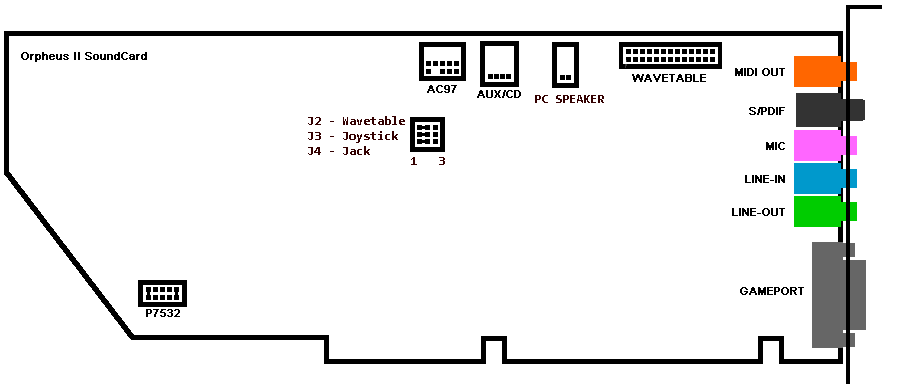
 |
PCMIDI Resources Control P - jumper closed = port 330 , open = port 300 3,5,7,2 = select *one* IRQ for use defaults shown: port 330 and IRQ2 selected with R1.1 boards you can also
select three additional IRQs: 10, 11 and 12 |
 |
MIDI Signal Routing Control (to allow a dual-mpu setup) With this jumper block you can select which MPU device controls each port. Move jumper to position 1+2 (for PCMIDI) or 2+3 (for CS4237) to select MPU. J2 = Wavetable Connector J3 = Joystick Connector J4 = MIDI Out Connector defaults shown: all ports controlled by PCMIDI MPU |
 |
InterWave 8/16bit slot selection On 2026 production boards there is now a physical jumber to select if the card is inserted in an 8bit slot (meaning the 16bit portion of the ISA pins are left floating) or a 16bit slot (all ISA pins of the card are inserted in the slot). Reason for that is that in most systems when the card is used in a 8bit slot InterWave will not initialize correctly - the jumper forces 8/16bit detection on the chip. Please DO NOT set the jumper to 8bit slot mode if you are inserting the card in a full 16bit ISA slot. Jumper in position 1+2 is 16bit ISA slot selection (default) Jumper in position 2+3 is 8bit ISA slot selection |
FAQ Tiido over at VOGONS
forum offers a service to convert a XR-385 to a proper PC
wavetable board - the converted boardAlternatively you can use a CHiLL interface from Serdashop
to convert the XR385 to an external midi device, the interface
has
Tiido over at VOGONS
forum offers a service to convert a XR-385 to a proper PC
wavetable board - the converted boardAlternatively you can use a CHiLL interface from Serdashop
to convert the XR385 to an external midi device, the interface
has  IRQ2/9 for PCMIDI MPUIRQ5 and DMA1 for the Crystal chip
to provide SB/SBPRO/WSS IRQ7 and DMA7 for the InterWave
chip to provide GUS
IRQ2/9 for PCMIDI MPUIRQ5 and DMA1 for the Crystal chip
to provide SB/SBPRO/WSS IRQ7 and DMA7 for the InterWave
chip to provide GUS 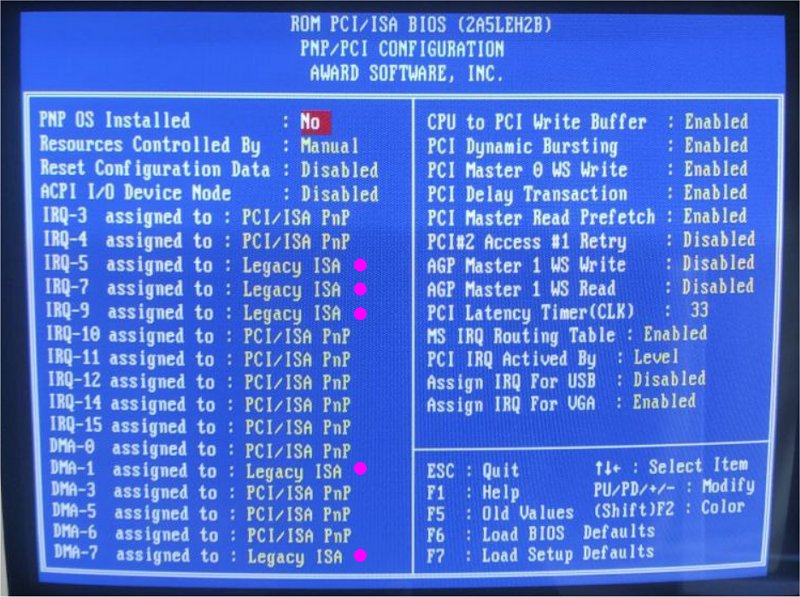
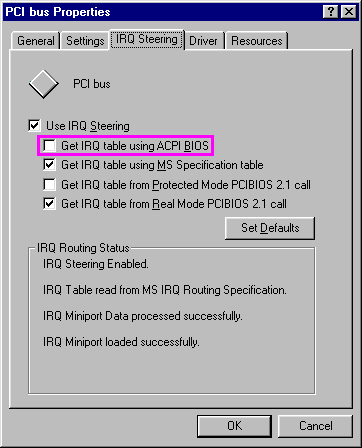
 HERE and HERE . HERE.MMX-aware driver released, offering
MMX mixing and filter support - check out the VOGONS
thread post! Local mirror HERE.HERE
.HERE
.tip
from user CHA0SHACKER :
HERE and HERE . HERE.MMX-aware driver released, offering
MMX mixing and filter support - check out the VOGONS
thread post! Local mirror HERE.HERE
.HERE
.tip
from user CHA0SHACKER :
 Driver
downloads:
Driver
downloads:
 |
Orpheus II DOS drivers consists
of 2 parts for now: a. Orphinit that will initialize the CS4237 part b. official Gravis UltraSound PnP or UniSound drivers that will initialize the GUS part |
 |
For best results remember to MUTE all InterWave inputs on the InterWave mixer application (MIC, Line-IN, CD-IN etc are not used at all on the InterWave portion of the card and muting these sources can lead to better output quality) . |
DOS: Orphinit
0.58ß version released, download
HERE .Please test this new version and
give feedback / bug reports either directly to Edro or Leo HERE
.HERE . DOS: OP2MIX
1.721 version released, download
HERE . DOS/win3x:
Gravis UltraSound PnP driver download HERE
. DOS: Gravis
UltraSound PnP PREINSTALLED driver v.4 download HERE
.This package is meant to be used under a pure DOS environment
(and not for DOS-under-win9x) and includes the following pre-installed
items : latest Gravis UltraSound PnP DOS
driversUltraSound Classic compatible patch
setUltraSound PnP 4MB patch setGravis sample midi filesUltraMID driver Please read the ORPHEUS2.TXT in
the archive for more info. Extract in root directory of C:\
and re-create the directories inside the ZIP file, for example
the DOS PKUNZIP command is: pkunzip ultrasnd.zip c:\ -d DOS: Jazz Jackrabbit
v1.1 Shareware version - Prepatched for InterWave - download
HERE .This is
a convenience package to test Gravis UltraSound playback under
DOS - it's the shareware version of Jazz Jackrabbit v1.1 with
PREPGAME already DOS/win3x/win9x/winNT:
Gravis UltraSound PnP driver floppy images download HERE
. Gravis
UltraSound PnP CD image download  HERE
(VOGONSdrivers mirror HERE
) . DOS:
UltraMID v1.12, download HERE
.
HERE
(VOGONSdrivers mirror HERE
) . DOS:
UltraMID v1.12, download HERE
.
 |
OrpheusII Windows9x drivers consists
of 3 parts: a. OrpheusII Win9x driver for the CS4237/YMF289 parts b. official Gravis UltraSound PnP for the GUS part c. PCMIDI driver |
|
|
For best results remember to MUTE all InterWave inputs on the InterWave mixer application (MIC, Line-IN, CD-IN etc are not used at all on the InterWave portion of the card and muting these sources can lead to better output quality) . |
|
|
OrpheusII Windows 3.1x CS4237
drivers can be found on the original Orpheus page HERE
. Please read the installation and limitations notes - the win3x
driver cannot be customized further and we have to use whatever
defaults Crystal decided upon. Keep in mind that the win3x drivers are poorly optimized and/or bugged and with many systems they cause delays in audio playback. There is no workaround for that and there is no other win3x driver version available. |
Windows 9x:
Orpheus II driver (CS-4237/OPL3), download
HERE.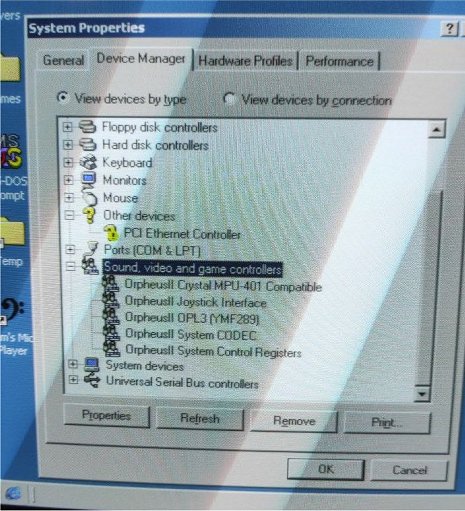 Windows 9x:
Gravis UltraSound PnP driver v2.2 (latest) download HERE
. Windows
9x: PCMIDI driverit is recommended to just use the
built-in MPU-401 driver that Windows 3x/9x offer Updated
PCMIDI driver/diagnostics package for REV 1.1 boards, when testing/detecting
IRQ 10/11/12
Windows 9x:
Gravis UltraSound PnP driver v2.2 (latest) download HERE
. Windows
9x: PCMIDI driverit is recommended to just use the
built-in MPU-401 driver that Windows 3x/9x offer Updated
PCMIDI driver/diagnostics package for REV 1.1 boards, when testing/detecting
IRQ 10/11/12 HERE .note: PCMIDI does not require any
kind of driver to work under DOS, the package above is provided
for completion/troubleshooting reasons Remember that the
onboard PCMIDI MPU-401 interface is not a PnP device and needs
to be added manually Gravis game patches & info links:Official AMD InterWave game
patch information webpage 04/02/1997 mirrorHow
to use Gravis UltraSound with Tomb RaiderThe
Gravis UltraSound Archiveshttp://dk.toastednet.org/GUS/https://gona.mactar.hu/GRAVIS/more to come...
HERE .note: PCMIDI does not require any
kind of driver to work under DOS, the package above is provided
for completion/troubleshooting reasons Remember that the
onboard PCMIDI MPU-401 interface is not a PnP device and needs
to be added manually Gravis game patches & info links:Official AMD InterWave game
patch information webpage 04/02/1997 mirrorHow
to use Gravis UltraSound with Tomb RaiderThe
Gravis UltraSound Archiveshttp://dk.toastednet.org/GUS/https://gona.mactar.hu/GRAVIS/more to come... Known issues: There are now some fixed
16bit and 32bit Sierra WSS drivers HERE and HERE thanks to 640k!enough , this is still a WIP
How to
order it:
Known issues: There are now some fixed
16bit and 32bit Sierra WSS drivers HERE and HERE thanks to 640k!enough , this is still a WIP
How to
order it:
 |
Before ordering the Orpheus II please keep
in mind that this is a piece of hardware for advanced users. It requires knowledge about how to effectively use the Gravis UltraSound PnP soundcard, some effort and games patching to make Classic GUS software compatible with it and on top you will have to juggle a 3in1 card: PCMIDI + CS4237 Soundcard + GUS PnP so good IRQ/DMA resource management is expected. This is not a warning to deter people from ordering but a warning of what to expect: you will face the same situations as with having an original GUS PnP card + a main soundcard + a MPU-401 interface installed togethere in a system. |
Pre-orders
of Orpheus II soundcard are now closed - thank you again for your
support!Contact information Contact
Form
Contact
Form Join the Discord Server
  |
Back to Index |